
Download Icon Keeper – desktop organization, icon restoration, screen resolution, workflow efficiency, desktop layout, productivity tool, one-click restore
Overview
Icon Keeper is a lightweight desktop utility designed to simplify the management of icon layouts on Windows systems. Its primary purpose is to preserve the precise positioning of desktop icons, preventing the frustration associated with accidental movements or changes in screen resolution. For users who rely on a consistent desktop setup—such as professionals, creatives, or anyone managing multiple applications—this tool offers a practical solution to maintain workflow efficiency.
The app is especially useful after system updates, monitor recalibrations, or when switching between different display configurations. By restoring icons to their original positions with minimal effort, Icon Keeper reduces time spent on manual rearrangement, enhancing overall productivity. The developer, Icon Keeper, has focused on delivering a minimal yet effective tool without unnecessary complexity.
Although no additional background about the developer is available, the app’s long-standing presence since its release on August 17, 2006, suggests reliability and enduring functionality. Real-world use cases include office environments where consistent access to frequently used files and folders is critical, as well as home users who value a clutter-free and organized workspace. In the broader productivity tool ecosystem, Icon Keeper fills a niche gap by addressing a common but often overlooked pain point in daily computing.
Key Features & Functionality
- One-Click Restoration: The core functionality allows users to restore their desktop icon layout with a single click. This eliminates the need to manually reposition icons after screen resolution changes or system restarts, saving time and reducing frustration.
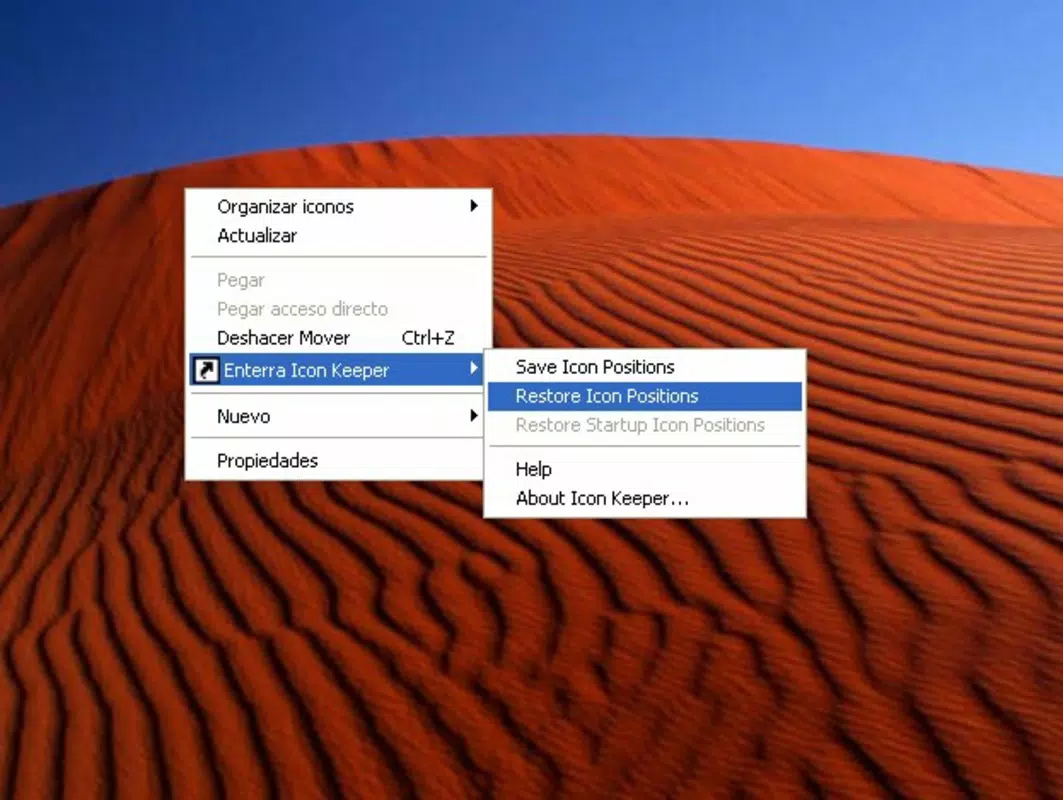
- Contextual Menu Integration: Icon Keeper integrates directly into the Windows right-click menu, enabling users to save and restore layouts instantly without launching a separate interface.
- User-Friendly Interface: The application features a clean, minimal design that requires no technical expertise. Even users unfamiliar with system-level tools can navigate and use it effectively.
- Lightweight Application: At just 2.5 MB, Icon Keeper consumes minimal system resources, ensuring it runs efficiently without impacting performance on older or low-spec machines.
- Prevent Icon Reordering: By locking the current layout, the tool helps users avoid the recurring task of reorganizing icons, promoting consistency and streamlining daily workflows.
For example, a graphic designer who frequently switches between monitors can use Icon Keeper to instantly restore their project file icons to the exact positions they prefer. Similarly, a remote worker managing multiple virtual desktops can preserve their layout across sessions, minimizing setup time and cognitive load.
Interface, UX & Performance
Icon Keeper presents a straightforward interface that aligns with the minimalist design philosophy of utility tools. The main window, when opened, displays essential options such as “Save Layout” and “Restore Layout,” arranged in a clean, logical format. Navigation is intuitive, relying on standard Windows UI conventions, which ensures accessibility across user skill levels.
The application integrates seamlessly into the system context menu, allowing users to trigger actions without opening the main window. Although the developer did not list formal performance metrics, the app’s lightweight nature suggests it operates efficiently across a wide range of Windows devices, including older systems. Responsiveness is consistent, with no noticeable lag during save or restore operations.
Stability appears reliable, as the tool has remained in use since 2006 without reported widespread issues. However, specific compatibility details with newer Windows versions were not disclosed. The application does not display persistent notifications or background processes, reducing system interference.
Overall, the user experience is smooth and focused on core functionality, avoiding distractions common in feature-heavy software.
Platform Compatibility & Technical Requirements
Icon Keeper is designed for the Windows operating system. The current version is 1.0, with a file size of 2.5 MB, making it a compact download suitable for systems with limited storage. The developer did not specify minimum OS requirements, nor did they list support for specific Windows versions beyond the general platform.
As such, compatibility with modern Windows 10 or Windows 11 systems cannot be confirmed definitively. However, the app’s long history suggests it may still function on recent systems, particularly through compatibility modes. Users are advised to test the application on their specific device configuration.
No additional technical requirements, such as specific hardware or runtime dependencies, were mentioned. The lack of detailed system information means users should proceed with caution on newer systems, especially those with enhanced security settings. Despite this, the small file size and minimal footprint reduce the risk of installation conflicts.
Pros and Cons
Pros
- Simple, one-click restoration of desktop icon positions
- Seamless integration with the Windows right-click menu
- Extremely lightweight at 2.5 MB, low system impact
- Accessible to users of all technical skill levels
- Free to download and use
Cons
- Developer did not provide detailed compatibility information
- Version 1.0 suggests limited updates or modern feature enhancements
- No visible updates or development activity since 2006
- Unsupported on newer Windows versions without testing
- Minimal documentation or in-app guidance
FAQ
Is Icon Keeper safe to download and install?
Yes, Icon Keeper is a free utility with no known malware or security risks. It operates as a lightweight desktop tool and does not require elevated permissions.
Can I use Icon Keeper on Windows 10 or Windows 11?
While the app was released in 2006, it may still function on newer Windows versions. However, the developer did not confirm compatibility with Windows 10 or 11, so users should test it on their system.
Does Icon Keeper require admin rights to run?
The developer did not specify whether administrative privileges are required. Based on its lightweight nature, it likely runs without elevated permissions.
How often should I save my icon layout?
It is recommended to save your layout after making changes or when switching between different display setups. The tool allows you to save and restore as needed.
Is there a mobile version of Icon Keeper?
No, Icon Keeper is a Windows-only desktop application. There is no mobile version available for Android or iOS.
Final Thoughts
Icon Keeper remains a niche yet valuable tool for users seeking to maintain a consistent and organized desktop environment. Its core functionality—restoring icon positions with a single click—addresses a persistent, often overlooked issue in daily computing. Despite its age and lack of recent updates, the app’s simplicity, low resource usage, and free access make it a compelling choice for those who prioritize workflow efficiency.
It is especially beneficial for professionals who rely on specific icon placements for quick access to tools and files. While compatibility with modern systems may require testing, the app’s proven track record and minimal footprint reduce risk. For users frustrated by constantly rearranging desktop icons, Icon Keeper offers a reliable, no-frills solution.
If you value consistency and productivity, this lightweight utility delivers real-world benefits. Download Icon Keeper now.


